Watch Your GPX File Fly Across a 3D Map — Free, In Your Browser
GPX Map 3D is a free online viewer for your GPS tracks: real elevation terrain, cinematic chase camera, weather forecast, and one-click WebM video export. No sign-up. No upload. Your routes stay on your device.
A real 3D GPS viewer that respects your time and your data.
Most GPS track viewers either lock the best features behind a paid plan, force a sign-up, or upload your routes to their servers. GPX Map 3D goes the opposite way: every pixel is rendered locally, every feature is free, and there is nothing to install.
100% free, forever
Every map, every overlay, every feature. No premium tier hiding the good stuff.
Your routes stay private
The whole app runs in your browser. Tracks, photos and annotations never get uploaded.
Zero ads, zero pop-ups
A clean canvas, every time. No banners, no upsells, no "sign in to continue".
Works offline
The app is cached after the first visit. Pre-fetch tiles for the track's area to roam map-less.
Real 3D terrain
Global elevation DEM from AWS Open Data, rendered with MapLibre's native 3D mode.
Six languages built in
English, French, Spanish, Portuguese, German and Italian — pick one in Settings.
Everything you need to relive — and share — a trek.
Open a GPX, watch it animate on 3D terrain, browse the elevation profile, look at the weather for the next week, pin your photos at the right spots, and export the whole flythrough as a video.
Animated chase camera
Three follow modes — chase, top-down, side. Smart anti-clip pass keeps the camera above the terrain mesh even on steep descents.
WebM video export
Record the playback as a WebM file at your screen's frame rate. Perfect for Instagram Stories, YouTube, or a personal archive.
Real elevation terrain
Global terrarium-encoded DEM from AWS Open Data. Hillshade is rendered on top so mountain shape reads naturally at any pitch.
Elevation profile
Live cursor synced with the camera position, sunrise / sunset markers, optional heart-rate / cadence / power overlay from the GPX extensions.
Photos at GPS coords
Drag a photo with EXIF GPS — it lands at the right spot on the map. Without EXIF, long-press the map to drop it manually.
User-added flags
Long-press the map to add a titled annotation. Stage 1, bivouac, water source — yours. Persist across reloads.
8-day weather forecast
Open-Meteo daily forecast at the route's bbox center. High / low / precip / wind / icon per day, no API key.
Trekking POIs
Mountain huts, shelters, water sources, springs and named peaks fetched live from OpenStreetMap (Overpass) within the track's bbox.
.gxm bundle export
One file that packages your GPX, your photos, your flags and your display settings — drop it back later to restore everything.
Map overlays in one toggle
All on by default — turn off what you don't need from the Display sheet.
Plan a hike from scratch — or edit an existing GPX.
Drop waypoints on the map, BRouter routes them along real trails, the elevation profile
fills in live. Free, in your browser, no API key. Save into the 3D viewer for instant
cinematic playback & video export — or download as plain .gpx for any GPS app.
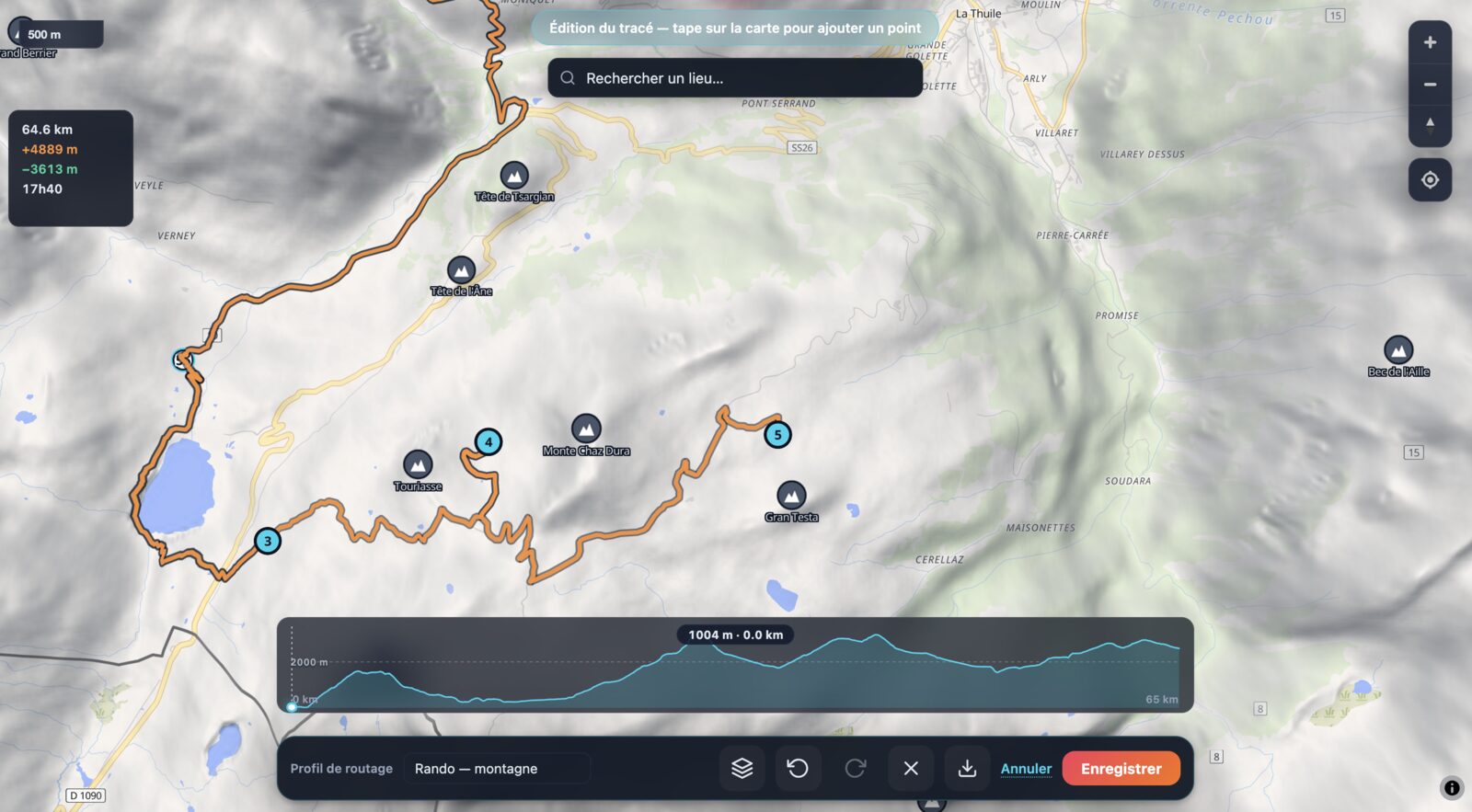
Tap to place waypoints
Click anywhere on the map. BRouter routes between consecutive points along real OSM trails — mountain hiking, fast hiking, walking, or MTB / trekking profile.
Drag to refine, click to insert
Drag any waypoint to fine-tune the route — adjacent segments re-route live. Click a segment line mid-route to insert a new waypoint that splits it cleanly.
Search Annecy, Mont Blanc, any refuge
Autocomplete search (Photon / OSM) jumps the camera anywhere on Earth in a tap. Find your trailhead, your refuge, your summit — start the route from there.
Live elevation + Munter time
Distance, ascent, descent and estimated trekking time update as you place waypoints. The elevation profile fills in as BRouter results arrive.
Show peaks & refuges while planning
Turn on POI layers (peaks, refuges, water sources) from the Display sheet — same per-kind toggles as in viewer mode. Plan around the landmarks that matter.
Edit an existing GPX
Load any GPX → "Continue editing this track" → it's auto-subsampled (Ramer-Douglas-Peucker) into editable waypoints. Reroute, extend, shorten, branch — full control.
Close as a loop, annotate, export
Click the first waypoint to close a loop. Name stages and viewpoints — exported as standard GPX <wpt> entries. Download .gpx for any GPS app, or save into the 3D viewer for instant playback + video.
100 % client-side, no API key
BRouter's free public instance + Photon geocoding + OpenFreeMap base tiles. No signup, no quotas to worry about, no upload of your draft to a remote server.
How GPX Map 3D stacks up.
A quick side-by-side with the GPS tools most people already use, for both the "just look at a track" and "plan from scratch" workflows.
| GPX Map 3D | Strava | Komoot | Garmin Connect | |
|---|---|---|---|---|
| Price | Free | Free + paid plan | Free + paid regions | Free (with device) |
| No account required | Yes | No | No | No |
| No ads | Yes | Yes | Yes | Yes |
| Routes stay on your device | Yes | No (uploaded) | No (uploaded) | No (uploaded) |
| 3D terrain playback | Yes | No | No | No |
| Animated chase camera | Yes | No | No | No |
| One-click video export | Yes | No | No | No |
| Plan a route + edit existing GPX | Yes | Paid plan | Paid regions | No |
| Works offline (after first visit) | Yes | No (web) | No (web) | No (web) |
| Installable as an app | PWA + macOS | Native | Native | Native |
Three steps to your first 3D flythrough.
No tutorial videos, no onboarding modal. Open the app and drag a GPX in.
Drop your GPX
Drag a .gpx, .kml or .gxm file onto the page. Or pick one from the built-in hike library.
Press Play, export the video
The 3D chase camera follows the route. Hit the red Record button to export it as a WebM video.
Things people use GPX Map 3D for every day.
Make a video of your hike for social
Open the GPX, set the playback speed and pitch in Settings, hit Record. You get a WebM file at canvas resolution, ready to share or convert.
Plan a multi-day trek
Multi-day GPX files are auto-segmented into stages from the timestamp gaps. Each stage gets its own distance, gain, loss and duration.
Check the weather for trip days
The 8-day forecast at the route's center comes from Open-Meteo. Decide if Tuesday or Thursday is the better day to leave.
Find huts and water on the way
Toggle the POI overlays in Display — mountain huts, shelters, water sources, springs and peaks are fetched live from OpenStreetMap.
Pin trip photos at the right spot
Drop a photo with EXIF GPS — it lands on the map automatically. Long-press to add one at the cursor location.
Bundle a trip into one file
Export a .gxm bundle containing the GPX, your photos, your flags and your display settings. Re-import it anywhere to restore everything.
Good questions, honest answers.
Can I plan a GPX route from scratch?
Yes. The built-in route editor lets you click waypoints on the map; BRouter automatically routes between them along real trails, with a hiking-mountain, hiking-fast, walking, or MTB / trekking profile. Drag a waypoint to reshape, tap a segment line to insert a mid-route waypoint, tap the first waypoint to close a loop. Distance, ascent and Munter time update live. Download as plain .gpx or save into the 3D viewer for instant playback + video export.
Can I edit an existing GPX file?
Yes. Load a GPX, click Plan a route, choose Continue editing this track — the loaded GPX is subsampled (Ramer-Douglas-Peucker) into ~30 editable waypoints, and BRouter re-routes between them. You can drag, insert, delete, extend or branch from any point and re-save as .gpx.
Is GPX Map 3D really free?
Yes — completely free, with no sign-up, no trial period, no premium tier. There are no ads anywhere. Every feature (3D terrain, chase camera, video export, weather, POIs, photos, offline mode, route editor) is available to everyone at no cost.
Do my GPX files get uploaded to a server?
No. The entire app runs in your browser. Your GPX files, photos and annotations never leave your device — there is no upload, no cloud storage, no telemetry on your route data.
Can I use GPX Map 3D on a phone or tablet?
Yes. The interface adapts to small screens and supports touch gestures (pinch-to-zoom, pan, long-press to add a point). You can also install it as a PWA from your phone's browser for a full-screen, app-like experience.
Which file formats are supported?
Import: .gpx, .kml and .gxm (the native bundle format that packages a track with its photos and flag annotations). Export: WebM video of the playback, .gxm bundles for backup and sharing.
Does GPX Map 3D work offline?
Yes. After the first visit, the app itself is cached and runs without a network connection. You can also pre-cache the map tiles for the current track's bounding box, so the 3D map loads offline too.
How is this different from Strava or Komoot?
GPX Map 3D is a free, account-free viewer and video exporter — not a social network or route planner. It focuses on cinematic 3D playback of an existing GPX file: real terrain, chase camera, video export. There is no community feed, no routing engine, no leaderboard.
Can I export a video for Instagram or YouTube?
Yes. The Record button captures the current playback as a WebM video at the canvas resolution and your chosen frame rate. Convert to MP4 with a tool like HandBrake if your destination platform doesn't accept WebM.
Can I install it as an app?
On any device the site is installable as a Progressive Web App. On Android Chrome, an install prompt appears automatically. On iOS Safari, use Share → Add to Home Screen. A native macOS desktop app is also available — built with Tauri.